portable antennas
Welcome to portable-antennas.com! - a collection of easy-to-use tools developed by a radio amateur (read more) for use by anybody with an interest in designing and building their own lightweight portable wire antennas for the HF amateur bands.
These antennas are primarily to be used in low-power person-portable / rucksack-portable activations of parks, hills and mountains, islands and lighthouses in the various amateur radio outdoor award schemes. They could also be used in Field-Day operations, either as the main antenna for a single-op entry, or as an alternative antenna for multi-op entries. Of course, the same antenna designs can also be used at a home QTH - just use more substantial fittings and support structures.
Easy to use
The tools provided in this site take much of the complexity out from the task of modelling and designing of simple wire antennas. Parameters such as frequency, wire lengths and angles are easily input, and results presented in interactive 3D graphical form at the click of a button.
This is achieved by having each of the designer pages in this site focus on one particular type of antenna, with custom code and options to match, making it much easier for the user to concentrate just on the antenna of their choice.
How traditional antenna modelling programs work
Programs such as EZNEC, MMANA-GAL and similar NEC-based tools need to be installed on the user's machine, and require the user to define the antenna geometry and dimensions explicitly. This typically involves specifying wire endpoints in 3-D Cartesian coordinates; also wire segmentation, feed-point locations and other low-level parameters.
This traditional approach certainly offers a high degree of flexibility and allows the modelling of arbitrary antenna structures - great for professionals. However, it also requires the following:
- the user must think in purely geometric terms
- the user must ensure the wire dimensions and endpoint coordinates are correct
- the user must ensure the resulting structure is electrically meaningful - i.e. capable of resonance at the chosen frequency.
Not everybody has the math / physics skills, or spatial ability, or patience, required to specify such details.
The portable-antennas.com approach
In contrast, this site - which runs in the user's web-browser and requires no installation - uses a parameterized design approach. Instead of defining geometry and dimensions directly, the user simply selects easily-defined antenna parameters:
- an antenna type
- band and frequency (see also "Notes on design frequency..." below)
- wire type, size and insulation
- antenna angles and heights above ground
- radials/counterpoise as needed
- other settings specific to the chosen antenna type
From these inputs, the antenna geometry and dimensions/coordinates are calculated automatically for you, using established electrical relationships (primarily wavelength scaling with appropriate physical corrections). No more guess-work; no more trigonometry; just concentrate on the task at hand: designing your antenna.
Once the geometry has been established, the user will want to see how the modeled antenna would perform in use. A set of controls is provided to allow the user to generate any desired combination of radiation patterns, VSWR chart and other charts and diagrams. This is achieved by using a dedicated NEC v4.2 engine, which runs in the background, and which uses the calculated geometry and dimensions of the antenna model to generate the required data.
Portable Antennas is designed to inform your decisions, not replace them. Rather than presenting any single answer, it provides the modeling tools and visualizations needed to understand how your antenna behaves, so you can decide which design, and which parameters, best suit your own operating requirements.
Please note: This site makes estimates of antenna impedance, matching, losses, and far-field radiation behaviour. The site does not provide RF exposure calculations, nor does it provide safety-distance compliance calculations.
Notes on design frequency and antenna resonance - important!
- The frequency entered by the user is used as a design frequency to generate the initial antenna geometry.
- Due to real-world effects and conditions such as wire diameter, insulation, height above ground, wire end effects and ground interaction, the antenna model will often not resonate exactly at the frequency initially chosen, nor at the desired operating frequency. The program will try to compensate for these factors, but fine tuning will often be needed.
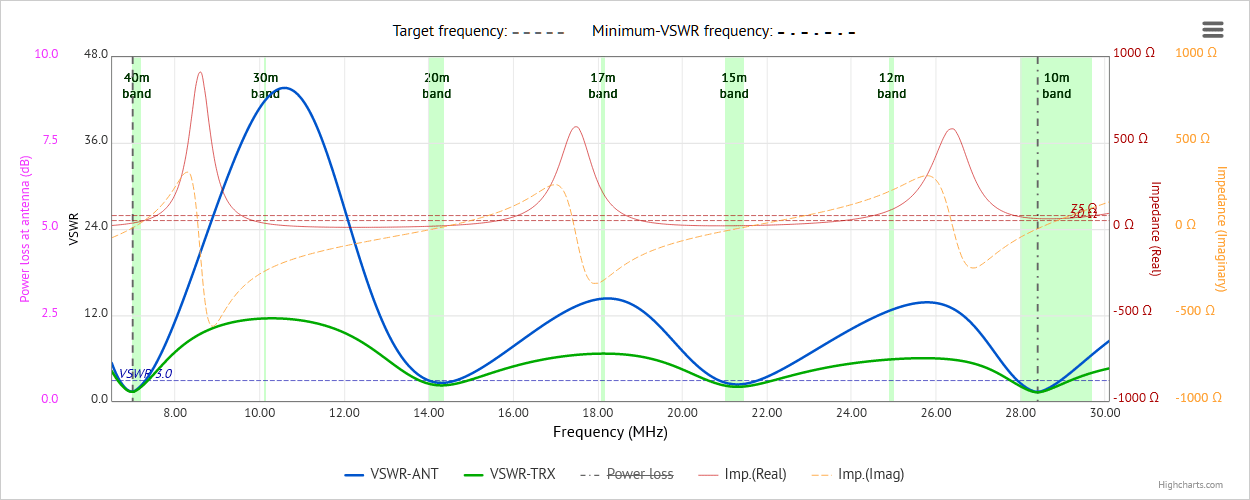
- The actual behaviour of the modelled antenna is shown in the VSWR curve, which represents the true electrical response of the model, with respect to frequency, including point(s) of resonance.
- By inspecting the VSWR curve, and the accompanying impedance curves, the user will often find it necessary to adjust the design frequency slightly, in order to shift the point(s) of resonance to the desired operating frequency/frequencies. This closely mirrors the real-world process of physically trimming an antenna to resonance.
-
Fine tuning in the program is an iterative process:
-
adjust the design frequency slightly

-
refresh the antenna display (this will use the design frequency to adjust the antenna dimensions)
-
display the VSWR curve, and check it for point(s) of resonance
-
repeat steps 1 to 3, until resonance is achieved at the desired operating frequency/frequencies
-
adjust the design frequency slightly
-
When your modeled antenna is finally created and erected "in the field", you will probably need to go through similar steps
- but now physically trimming the wire(s) - to ensure the real antenna itself is resonant at the desired operating frequency/frequencies.
The antenna types
Currently, the following antenna types for the HF bands can be modelled, with more being considered for inclusion:
- Linked dipole antennas - for single or multiple HF bands;
- Off-center-fed dipole (OCFD) antennas - capable of giving good results on several bands above the principal band;
-
End-fed half-wave (EFHW) and end-fed random-length (EFRL) antennas
- EFHW - capable of giving good results on several harmonically-related bands above the principal band;
- EFRL - capable of giving good results on several bands above the principal band, including WARC bands;
-
Vertical antennas
- for one single band, with all-round, low-angle radiation;
- now includes a loading coil calculator to enable shortened 1/4-wave verticals to be designed;
- Delta loop antennas - for a single band, providing a choice of polarization directions at low elevation angles - a good DX antenna.
- Half-square antennas - can be configured either as a full-wave single-bander, or as an EFHW multi-bander.
- NEW Doublet antennas - multiband ladder-line fed dipole antennas.
- Moxon antennas - for one single-band, a compact two-element beam antenna with good gain and very good F/B ratio.
A couple of "custom" antenna designers have also been developed,
for more specialized antenna types. These antennas are being used
in portable activations contexts,
but they're generally not as well-known or as popular as the more "standard" types listed above:
- "Hentenna" antenna - compact double-loop antenna with good DX properties, well-suited for portable use
- "VP2E" (Vertically-polarized 2-element) antenna - full-wave antenna, erected low above the ground, fed off-center, producing predominantly vertically-polarized waves, with modest gain
- "4DX" Dipoles-beam antennas - switchable, directional dipoles-beam antenna for one or more HF bands;
- "LoG" RX antenna - A "Loop on Ground" receiving antenna most suited to low bands use - not perhaps everybody's choice as an antenna for portable use, but it might be used as a receive antenna in combination with a more conventional antenna for transmitting, especially for the lower HF bands. In light of its' good SNR figures, it may be worth trying this out!
Radiation patterns, polarization patterns, VSWR charts, antenna currents diagrams and Smith charts
For each of the antenna types currently supported, any combinations of the following charts and diagrams can be generated and displayed:
- azimuth and elevation radiation patterns;
- azimuthal polarization patterns, showing both horizontal and vertical components of the polarization pattern, as well as their sum;
- 3D radiation patterns;
- VSWR curves, incorporating real and imaginary impedance curves - VSWR curves are displayed for either one single band, or over several bands;
- an antenna currents diagram, showing how currents are distributed in the antenna;
- a Smith chart, showing how antenna reactance changes with frequency.
Extras pages
In addition to the antenna designer pages, the site also offers a palette of Extras, arranged as separate groups of tab-pages, each group presenting a range of related topics:
-
Extras - coax data and charts
- data-sets and charts for over 20 coaxial cable types suitable for portable operations
- a chart of additional line losses due to SWR
- a chart of SWR at the transmitter plotted against SWR at the antenna, for various loss figures
- a discussion on how we calculate losses, due to a transmission line, in VSWR charts
-
Extras - calculators
- these are grouped for convenience in separate tab pages:
-
Tab #1 - Various calculators:
- a frequency to wavelength calculator
- a calculator to convert a VSWR value to mismatch loss, percentage power lost, etc.
- a Metric to Imperial units calculator
- a calculator to convert reactance value to inductance or capacitance value
- a calculator to add or subtract decibel values
- a calculator to find the matching impedance of a quarter-wave line matching transformer
-
Tab #2 NEW - Shortening coil calculator for 1/4-wave verticals:
- a stand-alone calculator to ascertain the dimensions of an inductive base loading coil for a shortened 1/4-wave vertical antenna - useful for low-band (80m, 160m) use
-
Tab #3 NEW - Single-band L-match calculator:
- Calculates values of components in an LC L-network (low-pass and high-pass) to match a source impedance to a load impedance at a single frequency
-
Tab #4 - Wire cutting/adjustment table:
- a table to aid in estimating the amount by which the length of a newly-constructed wire antenna should be adjusted, in order to achieve resonance at the design frequency
-
Tab #5 - End-fed random wire antenna lengths calculations:
- a configurable chart with which you can estimate an optimal length for an end-fed random-length (EFRL) wire antenna, based on wire type + insulation, and bands of interest
-
Tab #1 - Various calculators:
-
Extras - reference
- interactive animated standing-wave charts. Use controls to generate animated standing-wave charts for any VSWR value of your choice.
- tables and charts of reference correction factors used in the designer pages
- charts of length-correction factors for various types and/or thicknesses of wire insulation
Support pages
The site also offers the following support pages:
- Antenna types support, information and help - an overview of the main designer pages in the site, and includes descriptions of the antenna design pages, with some introductory information on each antenna type and its' characteristics.
- Radiation patterns overview - giving an overview of how radiation patterns are generated, and how they relate to each other.
- General site information - an overview of some aspects of the designer pages in the site.
About page / Contact form / User feedback / Disclaimer and Safety Notice
The site also offers the
- About page - which gives an overview of the history and aims of the site;
- Contact form - use this to report errors, request new features, or just to tell us how much you like this site!
- What users are saying - a sample of comments and testimonials received from users of the site;
- Disclaimer and Safety Notice - notes on this site's legal liabilities, and safety notice.
Footnote
Please be aware that this site is a work in progress, with updates occurring on almost a daily basis. From time to time, some functions
may not appear to work, or may not work correctly. This simply means that those functions are in the process of being updated or
changed. If it doesn't appear to work, refresh the page in your browser; if that doesn't work, check back later!
If any problems with the site should persist,
please use the Contact form to let us know!
 Web Hosting by Digital Ocean